 EEEN11202 course notes
2. Computer hardware
This isn’t a course on computer architecture, but it’s useful to know a little about what is inside a modern computer (both hardware and software) as it shapes how we go about our programming. This section gives a brief introduction, sufficient for the depth of this course.
A high level diagram showing the parts of a computer system is shown below. There are multiple different bits:
The processor, which is the heart of the system, executes the commands we ask the computer to carry out. Consumer grade computers typically only have one processor in them, but high end machines may have more than one to increase performance and to improve resilience in case one fails. Inside most processors there is more than 1 core, with these multiple cores allowing multiple things to be executed at the same time. There are different architectures of processor available. x86_64 from Intel/AMD, Arm (used in Apple computers and the Raspberry Pi), and RISC-V are all common. Generally, code compiled for one processor architecture will only run on that architecture, although programs that run on all platforms are also widely possible.
There is memory (known as RAM, or possibly a cache close to the processor, or registers in the processor) for storing data and variables while they are being actively worked on or used.
There is longer term memory, typically the hard drive, for storing data (for example when the computer is turned off) and data which won’t fit into the RAM.
There are a range of Input/Output (I/O) devices such as the screen and keyboard for interacting with the computer. These include a network port (wired or wireless) to connect to other devices.
There are specialist processing devices, in particular the graphics card. Graphics cards are very good at executing some types of tasks very quickly. A lot of machine learning uses the graphics card rather than the processor for doing the heavy lifting, as they are faster for this specialist task.
There are other computers connected across the network. These may provide more storage, or more processing power, or something else that helps the computer run.
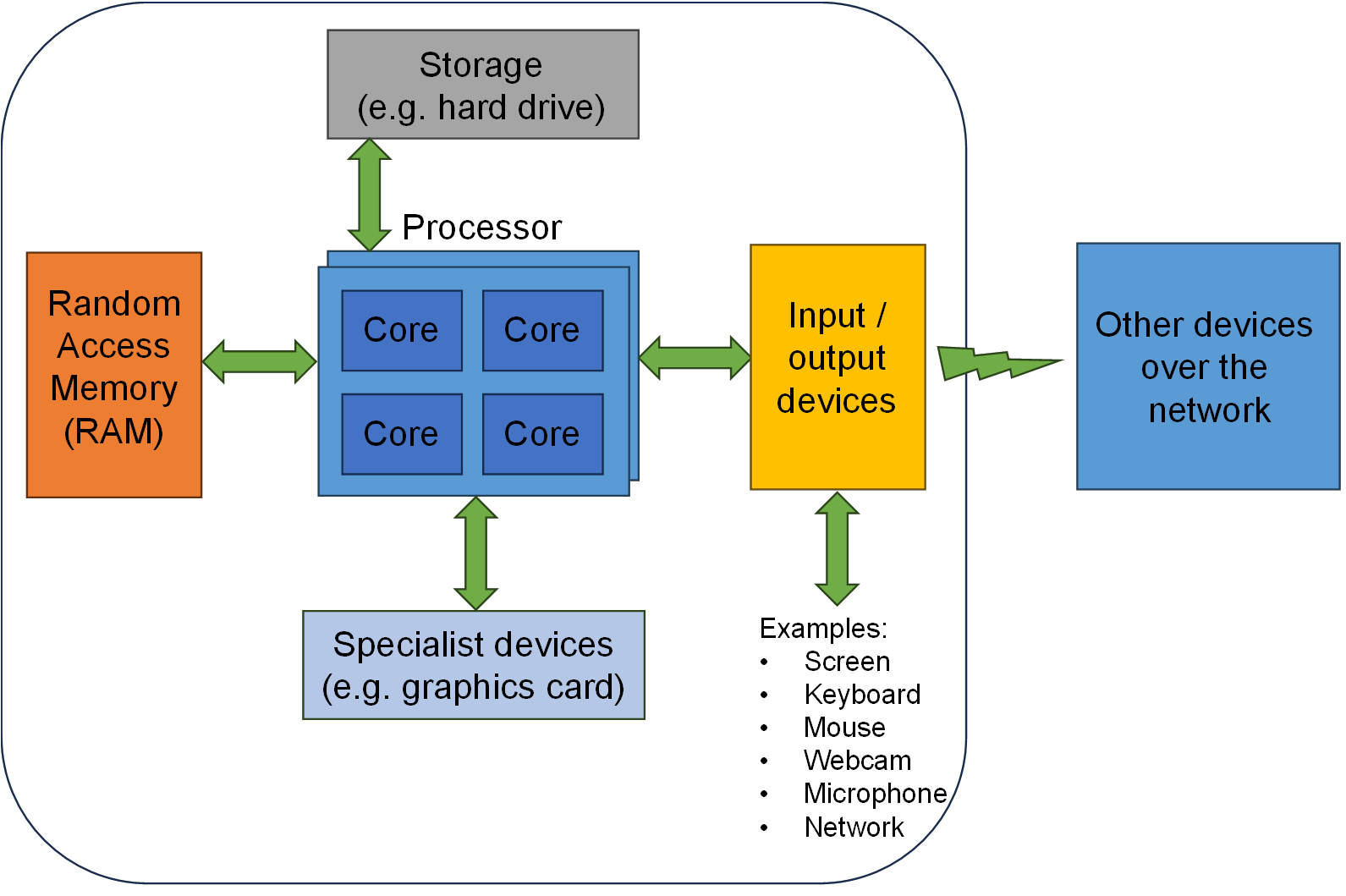
Each of these blocks represents a potential bottleneck when writing a program. For example, it could be that a program is I/O limited, where data can’t be passed into the program quickly enough (say as the data is coming from the Internet and the network connection is slow). Here, reducing the memory required for the program to run might be good to do, but it won’t help the program run any quicker. Alternatively, a program might be limited by how quickly the processor runs and can get through commands.
Whatever the bottleneck, there are techniques for reducing their impact. For example, to decrease the running time of a processor limited task, rather than asking users to buy a better processor(!), code can be re-factored to accomplish the same task in a different way. It’s not uncommon to try a few different ways of coding a particular function to see which works best. Alternatively, you can add multi-threading to the program, to allow the code to operate on more than one core (and processor) at the same time.
For the relatively simple programs we’ll be looking at in this course these limiting factors probably won’t present a big issue, and so you won’t need to think about what hardware the program is running on. Our code will thus generally be hardware agnostic. This won’t necessarily be the case when you move to more advanced topics, where you may need to think about what hardware your software is intended to run on and how you best optimize your coding for this hardware.
In general, the exception to the above is memory. For low level code, as we’ll get to in the second half of the course, managing the computer’s memory and thinking about where the data is stored, what has access to it, and how long the data is valid for (its lifetime) are important parts of the program. It’s likely that you’ll have to start thinking about memory, long before you have to start thinking about other aspects of how hardware might impact your code.