 EEEN11202 course notes
3.3.2. Unit testing with Pytest
The tools that we covered in the first part of the lab are generally for debugging: getting the code fundamentally working in the first place, and when it’s not working tracking down what’s going wrong. They are less for formal testing. At some point, you need to be able to convince yourself, and then others, that the code is working as intended. You probably need some documented evidence of this, rather than just asking people to take your word for it.
Unit testing is a standard approach for making a test suite. That is, a series of tests that the code can be run through and which it will either pass or fail. This is why we are generally putting all of our code into functions - it makes it easier to test each function in isolation.
There are a number of unit testing frameworks available for Python. We’re going to use one called Pytest, which is very widely used.
Danger
Our Pytest setup, using default settings, makes a number of assumptions about how you structured your project in the first part of the lab, and what some of your files and functions are called. If you find that Pytest is not working as expected, go back through the lab to make sure that you haven’t missed any steps. Ask a demonstrator for help if Pytest isn’t working for you.
3.3.2.1. Starter code
Make a new Python file in your Lab D
srcfolder calledlab_part2.pyand copy the code below into it.def calculate_overall_mark_a(student, EXAM_WEIGHTING, COURSEWORK_WEIGHTING): final_mark = (student["exam_mark"] * EXAM_WEIGHTING) + ( student["coursework_mark"] * COURSEWORK_WEIGHTING ) return final_mark def calculate_overall_mark_b(student, EXAM_WEIGHTING, COURSEWORK_WEIGHTING): final_mark = (student["exam_mark"] * EXAM_WEIGHTING) * ( student["coursework_mark"] * COURSEWORK_WEIGHTING ) return final_mark def check_whether_passed(marks): for student in marks: if marks[student] < 40: pass_status = "failed" elif marks[student] > 40: pass_status = "passed" else: raise Exception("Something must have gone wrong!") print(f"{student} has {pass_status} with {marks[student]} marks.") def main(): # Student information # Probably read from a file or database in practice student1 = {"exam_mark": 80, "coursework_mark": 75} student2 = {"exam_mark": 65, "coursework_mark": 70} # Constants for weightings EXAM_WEIGHTING = 0.8 COURSEWORK_WEIGHTING = 0.2 # Calculate final marks final_mark1 = calculate_overall_mark_a( student1, EXAM_WEIGHTING, COURSEWORK_WEIGHTING ) final_mark2 = calculate_overall_mark_a( student2, EXAM_WEIGHTING, COURSEWORK_WEIGHTING ) print(f"Final mark for student 1: {final_mark1}") print(f"Final mark for student 2: {final_mark2}") # Check whether passed or failed overall_marks = {"student1": final_mark1, "student2": final_mark2} check_whether_passed(overall_marks) if __name__ == "__main__": main()
This has two different functions,
calculate_overall_mark_aandcalculate_overall_mark_b, for calculating a student’s overall mark for the course based on their exam and their coursework marks. One of these functions is correct, and one deliberately has a bug in it. Hopefully you can tell which is which.It also has a function,
check_whether_passedwhich we’ll use later.Solution
calculate_overall_mark_ais correct.We’ll use
calculate_overall_mark_aandcalculate_overall_mark_bas examples to show how unit testing works.
3.3.2.2. Setting up Pytest
Pytest is not part of the standard library, and so it’s not installed by default. We’ll need to add it to our virtual environment.
At the terminal in your Lab D folder run:
uv add --dev pytest pytest-covIn Lab C we just used
uv addto add external packages to the virtual environment. We’ve now added--devto this command. This switch indicates that the packages being added are only needed for development of our code, and not for running the final program. A user who only runs the final code won’t need to install them.Open your
pyproject.tomlfile to see how this information is stored.[project] name = "lab-d" version = "0.1.0" description = "Add your description here" readme = "README.md" requires-python = ">=3.14" dependencies = [] [dependency-groups] dev = [ "pytest>=9.0.2", "pytest-cov>=7.0.0", ]
Next, we want to add a Python file containing our tests to the
testsfolder.Create a new file in there called
test_lab_d_code.py. It is important that the file name starts withtest_. By default, Pytest will detect and run tests that are stored in a Python file starting withtest_.Caution
Make sure your file is called
test_lab_d_code.pyand not :python:` test_lab_d_code.py`. Some students accidentally add a space before the file name, which means that Pytest won’t find the file and won’t run any tests.Note
In our
testsfolder there is an empty file called__init__.py. This needs to be present for the setup to work, even though the file itself is empty.Enter the following into your
test_lab_d_code.pyfile:import pytest from src.lab_part2 import * def test_function_a(): assert False
To understand this:
import pytestsets up Pytest.from src.lab_part2 import *tells this file where our code to test is. It’s in thesrcfolder, in a file calledlab_part2.py. (Python uses a dot.in the address rather than the slash/the terminal uses.)*tells Python to import everything from that file. We can use only parts of the file if we’d like.def test_function_a():is the code for our test. Here we have only test, and indeed one test that will alway fail. We’ll make it actually do something useful soon. Pytest will automatically find any function that starts withtest_and run it as a test.
The building block of unit testing is the
assertstatement. It is a bit like anifstatement: if whatever comes after the statement is true, the test passes. If whatever comes after the statement is false, the test fails.So, if you have
assert x == 3
you as the programmer are saying: at this point in the code I expect
xto be 3.The challenge in testing code is that you, the programmer, need to think of a number of test cases. These are different situations where you know what the results should be. You can then add these to your test function to check they’re actually what to get. It can be quite a lot of work to come up with test cases that cover everything.
To run Pytest
VSCode has a built-in interface for running Pytest tests. Click on the test tube icon in the left-hand menu bar to open this.
VSCode will automatically search for tests in your project and display these here. It can take a minute for tests to show up. If they don’t, check that you have named your test file and test functions correctly, and ask a demonstrator in the lab for help if needed.
You can press the
Run Testsbutton to run the tests.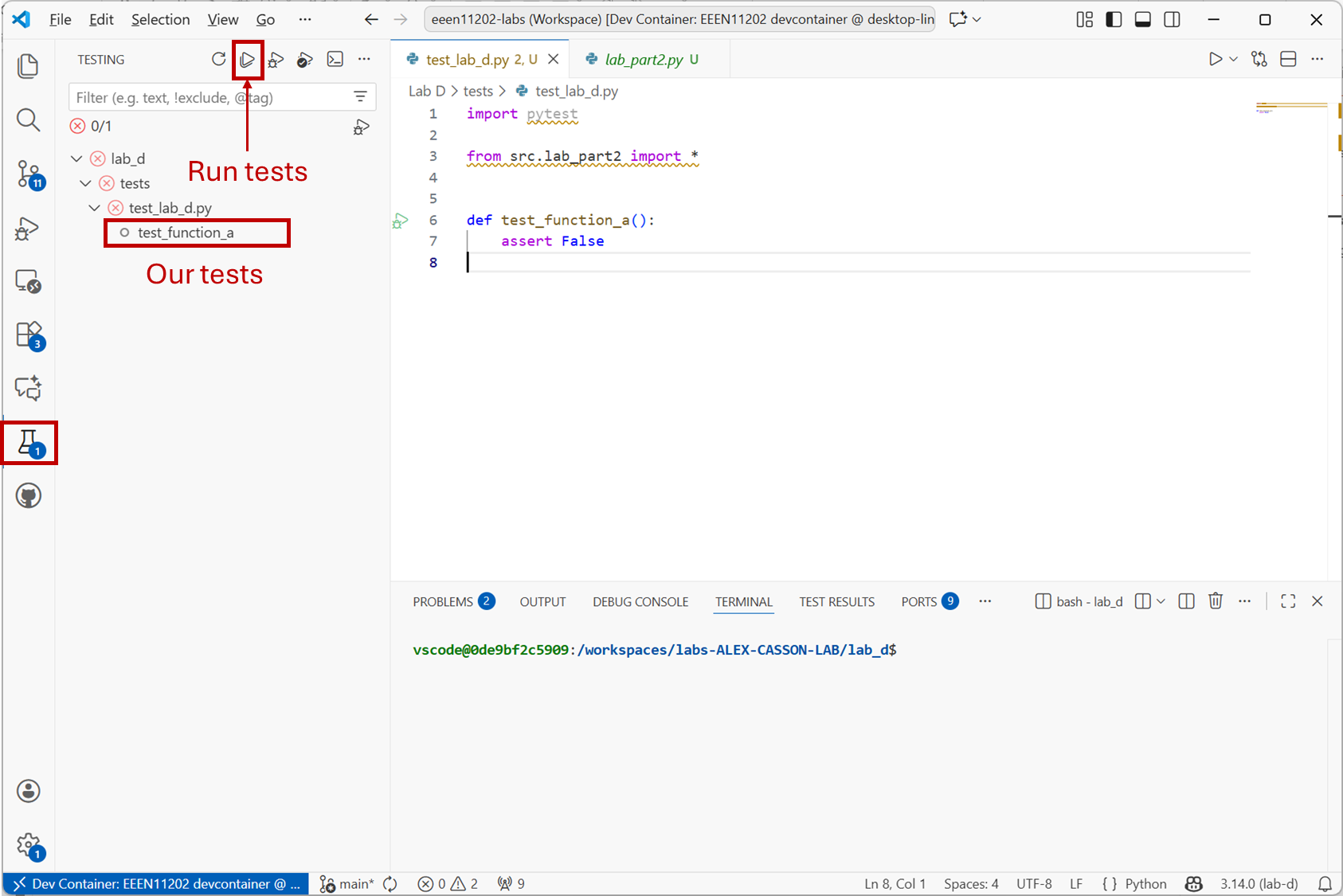
Screenshot of VSCode, software from Microsoft. See course copyright statement.
Note
Note that our
devcontainer.jsonfile, which we made for your and was automatically downloaded from GitHub, configures VSCode to use Pytest for you.If you are not using our devcontainer for some reason, for example you’re using your own local Python installation, you may need to configure VSCode to use Pytest manually. See here for more information.
Enter the command
uv run pytest
3.3.2.3. Making tests
At the moment we only have one test, and it contains
assert False. As a result, the test will always fail. Try changing this toassert Trueand re-running the tests to see that it now passes, and the different messages that you get.Replace the code in
test_lab_d_code.pywith the code below to add some actual tests for our two functions.import pytest from src.lab_part2 import * # Constants for weightings EXAM_WEIGHTING = 0.8 COURSEWORK_WEIGHTING = 0.2 def test_function_a(): student1 = {"exam_mark": 65, "coursework_mark": 34} correct_mark1 = 58.8 mark1 = calculate_overall_mark_a(student1, EXAM_WEIGHTING, COURSEWORK_WEIGHTING) assert mark1 == correct_mark1 student2 = {"exam_mark": 15, "coursework_mark": 70} correct_mark2 = 26.0 mark2 = calculate_overall_mark_a(student2, EXAM_WEIGHTING, COURSEWORK_WEIGHTING) assert mark2 == correct_mark2 student3 = {"exam_mark": 80, "coursework_mark": 90} correct_mark3 = 82.0 mark3 = calculate_overall_mark_a(student3, EXAM_WEIGHTING, COURSEWORK_WEIGHTING) assert mark3 == correct_mark3 def test_function_b(): student1 = {"exam_mark": 65, "coursework_mark": 34} correct_mark1 = 58.8 mark1 = calculate_overall_mark_b(student1, EXAM_WEIGHTING, COURSEWORK_WEIGHTING) assert mark1 == correct_mark1 student2 = {"exam_mark": 15, "coursework_mark": 70} correct_mark2 = 26.0 mark2 = calculate_overall_mark_b(student2, EXAM_WEIGHTING, COURSEWORK_WEIGHTING) assert mark2 == correct_mark2 student3 = {"exam_mark": 80, "coursework_mark": 90} correct_mark3 = 82.0 mark3 = calculate_overall_mark_b(student3, EXAM_WEIGHTING, COURSEWORK_WEIGHTING) assert mark3 == correct_mark3
Here we’ve made two functions,
test_function_aandtest_function_b, to testcalculate_overall_mark_aandcalculate_overall_mark_brespectively. In each case we pass the functions some inputs where we have already worked out what the function should do in that case, and then check whether the output is correct. If any of theassertstatements evaluate to false, the test should fail, flagging the’re an issue to fix.Make sure you save your changes before proceeding. Pytest will run on the saved version of the file, not what’s currently displayed if it hasn’t been saved.
Run the tests again. If you’re using the VSCode interface rather than the comamnd line, the output should look like the below. This shows that
test_function_apassed, buttest_function_bfailed.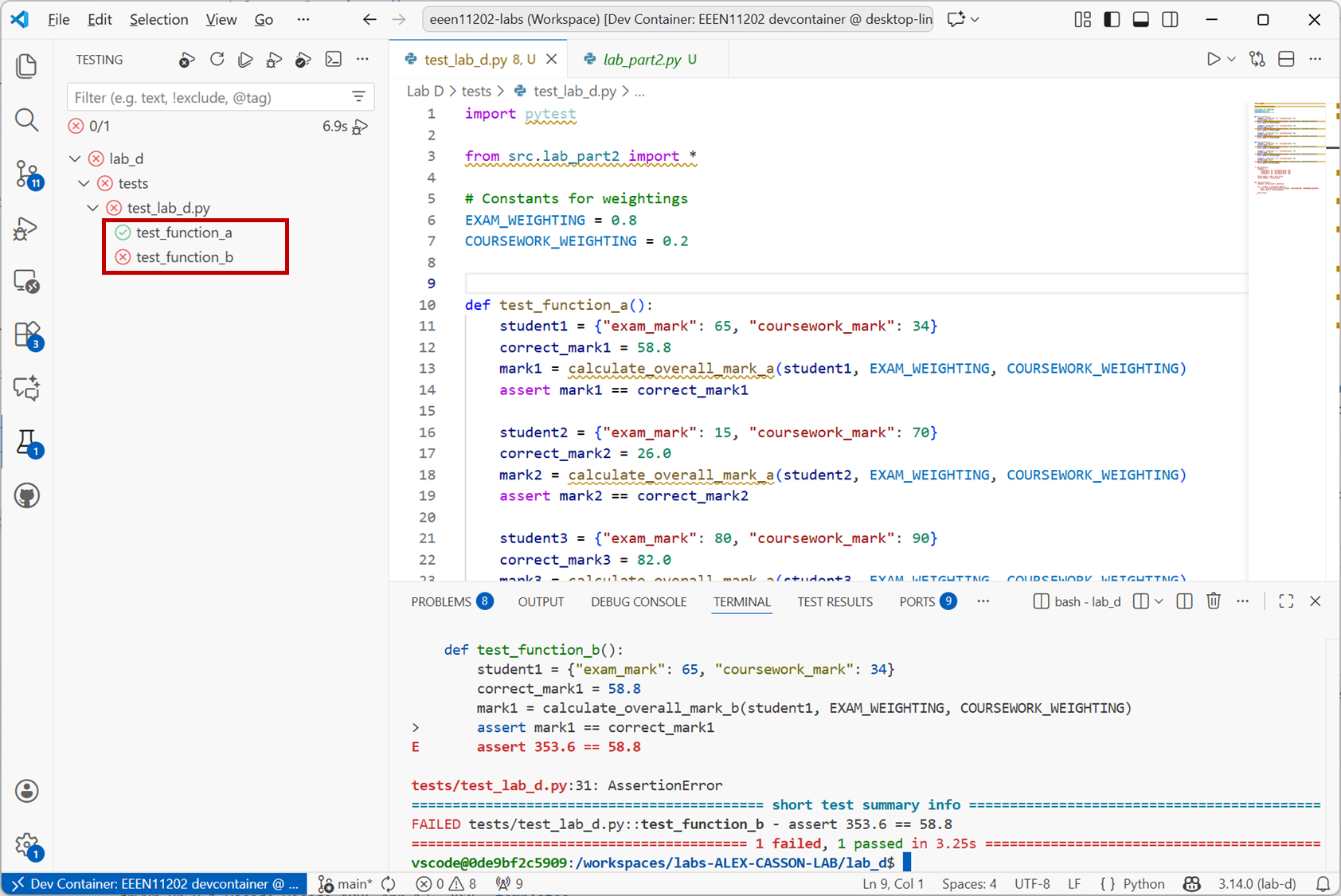
Screenshot of VSCode, software from Microsoft. See course copyright statement.
Here we’ve passed three different test cases to each function. We could have passed more, or less. A key part of testing is deciding which inputs you need to pass to a function in order to be confident that it’s working correctly.
Fix the bug in
calculate_overall_mark_bso that both tests pass.Solution
In function
calculate_overall_mark_bchangefinal_mark = (student["exam_mark"] * EXAM_WEIGHTING) * ( student["coursework_mark"] * COURSEWORK_WEIGHTING )
to
final_mark = (student["exam_mark"] * EXAM_WEIGHTING) + (
    student["coursework_mark"] * COURSEWORK_WEIGHTING
)
Our test functions
test_function_aandtest_function_bare very repetitive. They are doing the same thing three times - passing in different inputs and checking the output. Re-write the functions to put the into a for loop.Solution
import pytest

from src.lab_part2 import *

# Constants for weightings
EXAM_WEIGHTING = 0.8
COURSEWORK_WEIGHTING = 0.2


def patterns():
    students = (
        {"exam_mark": 65, "coursework_mark": 34},
        {"exam_mark": 15, "coursework_mark": 70},
        {"exam_mark": 80, "coursework_mark": 90},
    )
    correct_marks = (58.8, 26.0, 82.0)
    return students, correct_marks


def test_function_a():
    students, correct_marks = patterns()

    for i, student in enumerate(students):
        mark = calculate_overall_mark_a(student, EXAM_WEIGHTING, COURSEWORK_WEIGHTING)
        assert mark == correct_marks[i]


def test_function_b():
    students, correct_marks = patterns()

    for i, student in enumerate(students):
        mark = calculate_overall_mark_b(student, EXAM_WEIGHTING, COURSEWORK_WEIGHTING)
        assert mark == correct_marks[i]
Here we’ve put our test patterns in a function called
patterns, which both tests call. In most cases, where you have lots of tests, it’s probably better to put the test inputs and the expected outputs in a seperate file which you read in. This helps you develop your test cases separately from your code, and becomes more important as you have more and more test patterns.
3.3.2.4. Test coverage
When setting up Pytest we also installed pytest-cov. cov here is short for coverage. This tool lets us measure how much of our code is being tested by our tests.
To run this:
Click on the
Run Tests with Coveragebutton.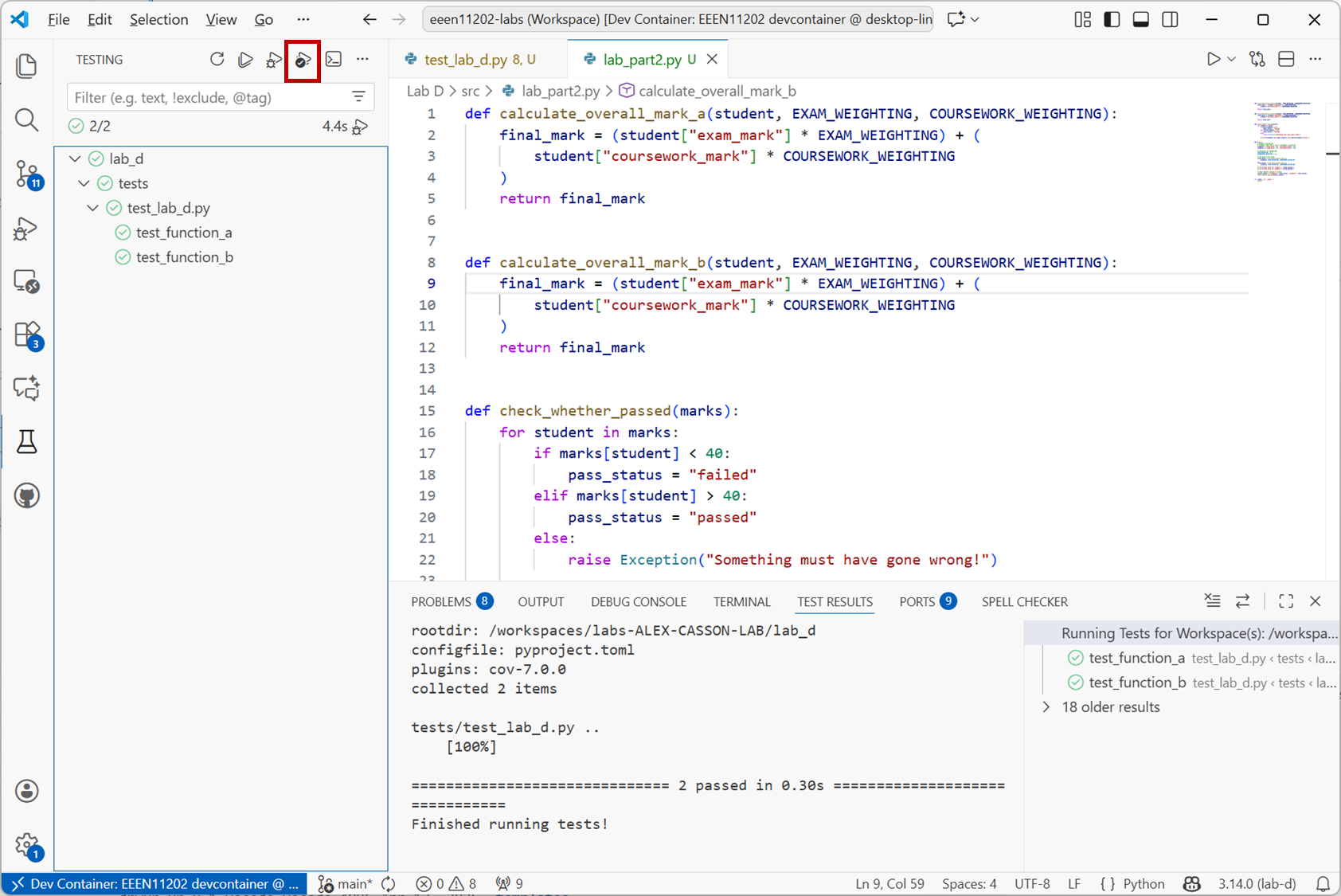
Screenshot of VSCode, software from Microsoft. See course copyright statement.
Enter the command
uv run pytest --covIf you used the VSCode GUI, you should see a coverage report like the below. Our tests are currently only testing around 29% of the code in this file. Your test coverage number might vary a bit depending on coding style and the formatting of your code.
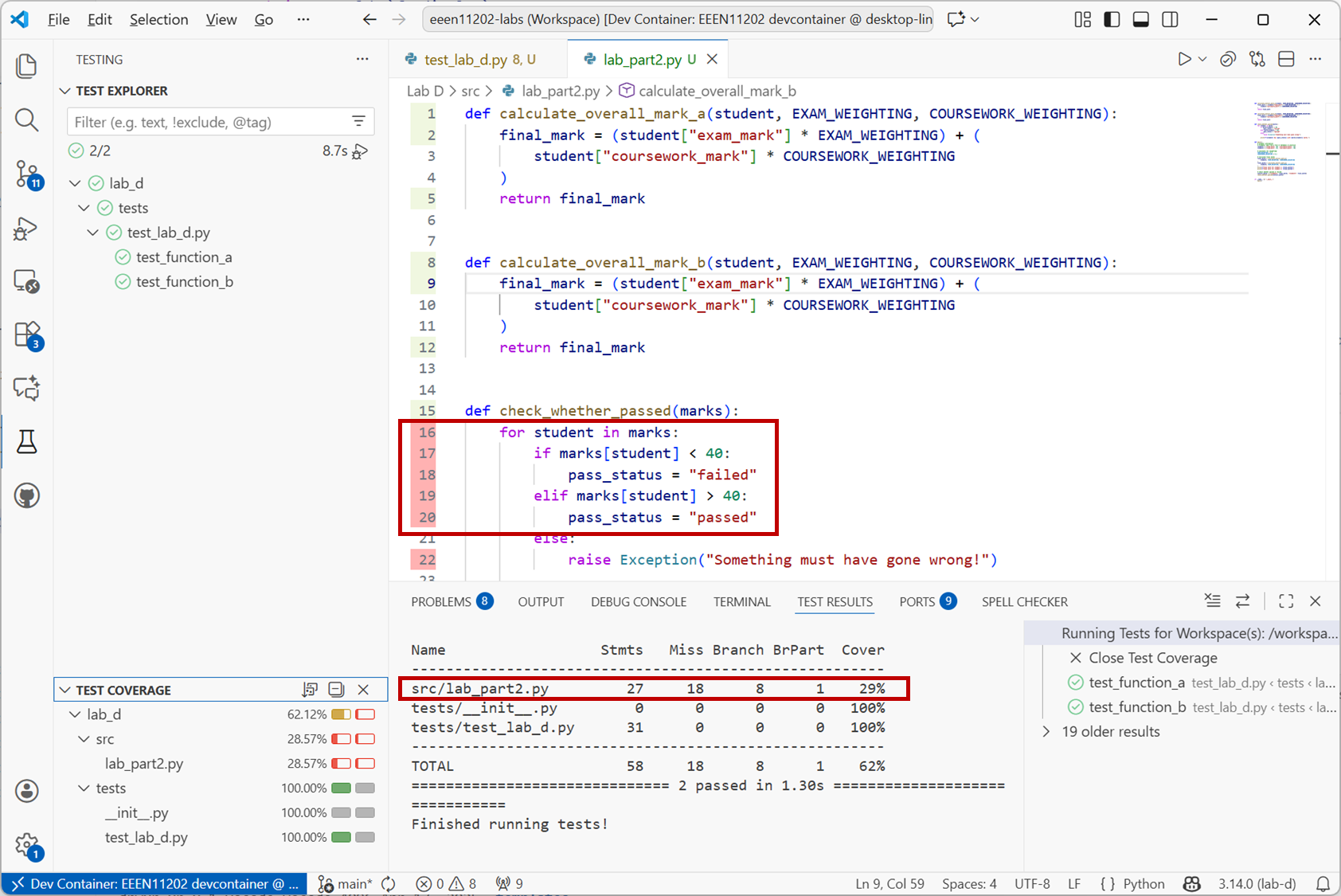
Screenshot of VSCode, software from Microsoft. See course copyright statement.
VSCode has also highlighted which lines of code are not being tested.
At the moment we’re not testing the
check_whether_passed()function. This is a copy of the function that we had in the second part of Lab C which has a bug in it.In your
test_lab_d_code.pyfile, add a new test function to testcheck_whether_passed().Solution
def test_check_whether_passed():
    for i in range(0, 101):
        # Simulated mark
        marks = {"student": i}

        # Expected pass status
        if i < 40:
            expected_status = "failed"
        else:
            expected_status = "passed"

        # Run function
        pass_status = check_whether_passed(marks)

        # Run check
        assert pass_status == expected_status
3.3.2.5. A final example
Add the function below to your
lab_part2.pyfile.def make_sine_wave(): """ Make a sine wave signal TO DO: replace range with a numpy array Returns: t: time samples v_out: voltage samples """ sample_start = 0 sample_stop = 100 A = 1 # Volts f = 0.1 # Hz t = range(sample_start, sample_stop) # interpret as representing 1 s, 2 s, 3 s, ... v_out = [A * math.sin(2 * math.pi * f * time) for time in t] return t, v_out
This is code that we first used in Lab B, and we turned it into a function in the first part of Lab C. It makes a sine wave signal.
Write a test function in your
test_lab_d_code.pyfile to testmake_sine_wave().Solution
There are probably some choices to make in how comprehensively to test this function. We don’t want to just use the
math.sin()function in our test, as that’s what the function uses so it isn’t really testing anything. Instead, in the below we pass three known values of the the result. We selected three arbitrarily, more values would provide more comprehensive testing, at the cost of time to write more test cases.Note that we also use
math.isclose()to compare the numbers. This allows for some floating point errors. We don’t need the output from the function and the output we expect to match exactly, as long as they’re close enough we’ll let the test pass.import math def test_make_sine_wave(): t, v_out = make_sine_wave() # Check first few values expected_v_out = [0.0, 0.587785, 0.9510565] for i in range(len(expected_v_out)): assert math.isclose(v_out[i], expected_v_out[i], rel_tol=1e-5)
Optional challenge: Can you get the test coverage of your
lab_part2.pyfile to 100% (or to close to 100%)?Aside
We don’t have a full solution to share for this, it’s a challenge for you to try.
The best approach probably isn’t to add lots of more test cases, but to think about how the code is structured. We’ve already added test cases for all of the functions, except
main(). However,main()is just calling the other functions that we’ve already tested, so it’s hard to make test functions formain()itself. You could try capturing the printed output and checking that it matches what you expect.Instead you can re-factor your code into a library of functions that do the work, putting these in one file. Then, in a separate file, have a script (the current
main()function) that calls the library functions.This lets you test the library functions in isolation and get 100% (or close to this) coverage of the library functions in
lab_part2.py. The testing task forlab_part2.pythen switches from, are my functions correct to am I using my functions to correctly do what I want to. This still needs testing, but it’s a higher level test.We’ll cover splitting code across multiple files in Lab H.
As with many of the things we’ve looked at so far in the course, there’s much more that you can do with testing, and many ways to customize the tests and make them more powerful. At the moment we’re just building familiarity. In your wider reading, explore some of the other things you can do with Pytest.
The Lab D assignment focuses on asking you to write a test quite. A later assignment will do the same. In between, we won’t explicitly ask you to write a test suite in every lab, but in every lab you should be thinking about how you’re testing your code.
Check your code in to Git before proceeding.